
Questions
Answers to common questions
Who is Mirra?
Mirra is Mirramind's guide, a virtual assistant who welcomes you, shows you around and answers questions in Chat. She is not a person and doesn't pretend to be one. You can make your own copy of her, or make your own personas with their own look and voice.
How do credits work?
You pay as you go. 100 credits = $1, and new accounts start with 100 free credits. Every picture, clip, voice and answer shows what it cost, and Usage shows where your credits went. See <a href="/credits">Pricing</a> for examples.
What's free?
Posting to your channels, reviewers, the read-through, making the full storyboard video in your browser, editing and MP4 export, and keeping your Files.
Do I need a subscription?
No. Buy credits when you need them. Monthly plans and auto top-up are there if you want them, and nothing renews unless you switch it on.
Who can see what I make?
Your Files are yours. Others see only what you share: posts to the Community, review links and watch links. You can delete them any time.
What can the site's owners see?
The people who run Mirramind can see each account's usage (what kind of job, when, and the credits) and requests checked by the content filter. When they need to, for support or safety, they can open an account's map of chats, pictures and files, and every time they do it's written down.
What happens to the private files I give a persona?
Only you can open them, and they're deleted after 90 days. What your persona learned from them stays, and you can see and edit what it remembers.
Are there things it won't make?
Yes. Some content is never made, for anyone. Other limits depend on the content level of your account. Use a photo or video of a person only if it's you or you have their permission.
Is a persona a therapist?
No. The good listener persona is supportive, but it isn't a therapist. If you're in crisis in the US, call or text 988.
Does it work on my phone?
Yes. Mirramind runs in your phone's browser, and you can add it to your home screen like an app. Your chats, Files and storyboards are the same on every device.
Can I download what I make?
Yes. Download pictures, videos (MP4 from the editor), captions files, voices, 3D models and games, and use them where you like.
Where do my posts go?
Only to the channels you connect yourself, and only when you press Publish or a time you picked comes. Places you haven't connected use Copy and upload yourself.
On your phone
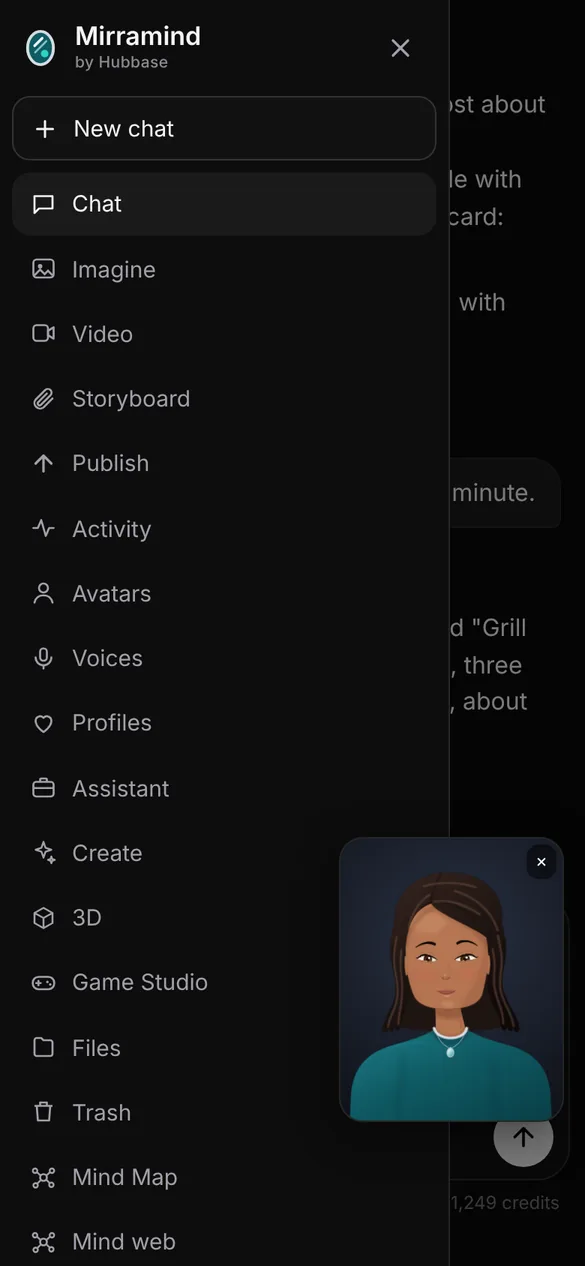
Everything is in the menu
On a phone, the menu holds every part of the app: chat, Imagine, Video, Storyboard, Publish, Avatars, Voices, Game Studio, Files and the Community.
Still have a question?
Send us a message and we'll get back to you.